

Introduction
Getting a page to rank in Google isn’t simply about adding a keyword to an article.
Search engines need to understand what your page is about, who it is intended for, and whether it provides a useful answer to the searcher’s query.
That’s where On-Page SEO comes in.
On-Page SEO is the process of optimizing the elements of an individual webpage—including its content, title, headings, URL, images, internal links, and other page-level elements—to make the page easier for both users and search engines to understand.
Unlike many external SEO factors, you have direct control over most On-Page SEO elements.
That makes it one of the most practical areas of SEO to improve.
This guide explains the major On-Page SEO factors, how to optimize them, common mistakes to avoid, and a practical process you can use when creating or improving pages.
This guide is part of our Complete SEO Guide, which covers the broader SEO process from keyword research and technical optimization to content, links, and search visibility.
What Is On-Page SEO?

On-Page SEO refers to optimizing individual webpages and their content to improve their relevance, usability, clarity, and visibility in search engines.
It includes elements such as:
- Page titles
- Headings
- Main content
- Search intent
- URLs
- Meta descriptions
- Images
- Internal links
- Content structure
- User experience
- Structured data where appropriate
The objective isn’t to manipulate search engines by repeating keywords.
The objective is to create a page that clearly communicates its topic while giving visitors the information they came to find.
A properly optimized page should make sense to a human reader first. Search engines can then use the page’s content and structure to better understand its subject and relevance.
Why Is On-Page SEO Important?
Search engines need to understand a webpage before determining whether it may be relevant to a particular search.
Good On-Page SEO helps provide that context.
It can help you:
- Make your content easier to understand.
- Align your page with search intent.
- Improve organic search visibility.
- Create a better user experience.
- Help search engines interpret page structure.
- Strengthen relationships between related pages.
- Make important information easier to find.
- Support your broader topical SEO strategy.
On-Page SEO also gives website owners direct control over many optimization opportunities.
You cannot control which websites decide to link to you, but you can control your page title, content, headings, images, internal links, and URL.
On-Page SEO vs Off-Page SEO vs Technical SEO
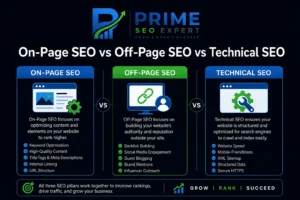
These three areas are closely connected, but they focus on different parts of SEO.
| SEO Area | Main Focus | Examples |
|---|---|---|
| On-Page SEO | Individual webpages | Content, titles, headings, internal links |
| Off-Page SEO | External signals | Backlinks, mentions, digital PR |
| Technical SEO | Website infrastructure | Crawling, indexing, performance, mobile usability |
A strong SEO strategy usually requires attention to all three.
On-Page SEO helps make your content useful, relevant, and understandable.
Technical SEO helps search engines access, crawl, render, and index your website effectively.
Off-Page SEO can help establish authority and reputation through external signals such as relevant backlinks and mentions.
The Most Important On-Page SEO Elements
There isn’t a single optimization that guarantees rankings.
Instead, effective On-Page SEO comes from getting many individual elements right while keeping the user’s needs at the center of the page.
Search Intent
Before optimizing a page, understand what the searcher actually wants.
For example, someone searching:
“What is On-Page SEO?”
is probably looking for an explanation.
Someone searching:
“best On-Page SEO tools”
may be comparing different tools.
Someone searching:
“On-Page SEO service”
may be looking for a company that provides SEO services.
These searches represent different needs and shouldn’t automatically lead to the same type of page.
Common search intents include:
- Informational
- Navigational
- Commercial investigation
- Transactional
Before creating content, search your target query and study the results.
Look at the types of pages Google is ranking:
- Guides
- Tutorials
- Service pages
- Product pages
- Category pages
- Comparisons
- Reviews
The search results can provide useful clues about the format and purpose that users expect.
SEO-Friendly Title Tag
The title tag is one of the most important page-level elements.
It helps users and search engines understand what the page is about and often appears as the primary clickable title in search results.
For this guide, for example:
On-Page SEO: The Complete Guide to Optimizing Your Website
A good title should be:
- Clear
- Relevant
- Descriptive
- Concise
- Naturally written
- Closely aligned with the page content
Avoid turning the title into a list of repeated keywords.
Poor example:
On-Page SEO | On-Page SEO Guide | On-Page SEO Techniques | On-Page SEO
Better:
On-Page SEO: The Complete Guide to Optimizing Your Website
Meta Description
A meta description provides a short summary of a webpage.
Google may use it to create the search-result snippet, although it can generate a different snippet depending on the search query.
A useful meta description should accurately explain what the page offers and encourage the right users to click.
For this guide:
Learn On-Page SEO step by step. Optimize titles, headings, URLs, content, images, internal links, meta descriptions, and more.
Don’t treat the meta description as a place to stuff keywords.
Write it for people who are deciding whether your result is relevant to their search.
Use a Clear Main Heading
Every important page should clearly communicate its primary topic.
For this article, the main heading is:
On-Page SEO: The Complete Guide to Optimizing Your Website
After the main heading, organize the content with logical subheadings.
For example:
What Is On-Page SEO?
then:
Why Is On-Page SEO Important?
and supporting sections underneath where necessary.
A logical heading structure makes long content easier to scan and helps readers quickly find the information they need.
Create Helpful, Comprehensive Content
No amount of technical optimization can compensate for poor content.
Your page should solve the problem behind the search.
Good content should be:
- Useful
- Accurate
- Original
- Easy to understand
- Well organized
- Relevant to the search intent
- Updated when necessary
Don’t make an article longer simply to increase its word count.
A 3,000-word article isn’t automatically better than a 1,000-word article.
The appropriate depth depends on the topic and the information users need.
The goal should be complete coverage of the topic without unnecessary filler.
Use Keywords Naturally
Your primary keyword should appear naturally in relevant locations.
Depending on the page, this can include:
- Title
- Main heading
- Introduction
- Relevant subheadings
- Body content
- URL where appropriate
- Image alt text when genuinely descriptive
There is no universal keyword-density percentage that guarantees rankings.
Forcing an exact keyword into every paragraph can make content awkward and reduce readability.
Instead, cover the subject naturally using related concepts and terminology.
For an On-Page SEO guide, these might include:
- Search intent
- Title tags
- Meta descriptions
- Internal links
- Image optimization
- URLs
- Content quality
- Structured data
- Mobile usability
- Page experience
This creates useful topical context without keyword stuffing.
Optimize Your URL
A clean URL helps users understand what a page is about.
For this article:
/on-page-seo-guide/
is simple and descriptive.
Avoid unnecessarily complicated URLs such as:
/2026/08/blog?id=4829&topic=seo-on-page-guide
Good URLs are generally:
- Short
- Descriptive
- Relevant
- Easy to read
However, don’t change an established URL just to make it slightly shorter.
Changing URLs can create redirects, broken links, and other unnecessary complications.
Optimize Images
Images can improve understanding and make long content easier to consume.
They should also be optimized for performance and accessibility.
Useful image practices include:
- Use relevant images.
- Compress large files.
- Use appropriate dimensions.
- Choose efficient formats where supported.
- Give images descriptive filenames.
- Add useful alt text when appropriate.
- Avoid unnecessary decorative images.
Poor filename:
IMG_8723.jpg
Better filename:
on-page-seo-checklist.jpg
Alt text should describe the actual image rather than simply repeat the target keyword.
For example:
On-page SEO checklist showing key optimization elements
is better than:
On-page SEO on-page SEO on-page SEO
Internal Linking
Internal links connect pages within your website.
They help visitors discover related information and can help search engines understand relationships between different pages.
This guide should link back to the main Complete SEO Guide because the pillar provides broader coverage of the SEO process.
It can also connect with related resources such as:
- Keyword Research
- Technical SEO
- Content Strategy
- SEO Audit
- Local SEO
- Link Building
Use descriptive anchor text where possible.
For example:
Learn how to conduct effective keyword research.
is more informative than:
Click here.
External Links
External links can improve the usefulness of a page when they point readers toward trustworthy, relevant sources.
For example, when discussing Google’s search documentation, an official Google resource can give readers a way to verify information or explore a topic in more depth.
Don’t add external links simply to reach a specific number.
Relevance and quality are more important than quantity.
Content Structure and Readability
Most visitors don’t read long webpages word-for-word.
They scan.
Make your content easy to navigate with:
- Short paragraphs
- Descriptive headings
- Bullet lists
- Tables
- Examples
- Images
- Appropriate emphasis
- Sufficient white space
A well-structured page allows visitors to find the section they need without reading the entire article.
Optimize for Mobile Users
Your page should work properly across different screen sizes.
Check:
- Text size
- Buttons
- Navigation
- Images
- Tables
- Forms
- Spacing
- Horizontal scrolling
Don’t optimize only for desktop.
Open important pages on an actual mobile device and test how they look and behave.
Improve Page Experience
Visitors should be able to access and use your content without unnecessary friction.
Avoid:
- Aggressive pop-ups
- Excessive intrusive elements
- Layout problems
- Slow-loading media
- Difficult navigation
- Tiny text
- Unexpected movement
Page experience isn’t about achieving a perfect score in every SEO tool.
It’s about creating a website that is accessible, usable, stable, and pleasant to navigate.
Core Web Vitals
Core Web Vitals measure important aspects of page experience.
They currently focus on three areas:
Largest Contentful Paint (LCP) measures loading performance.
Interaction to Next Paint (INP) measures responsiveness to user interactions.
Cumulative Layout Shift (CLS) measures visual stability.
Improving these areas can contribute to a better user experience.
However, don’t sacrifice useful content or important functionality simply to chase a perfect performance score.
Structured Data
Structured data gives search engines additional information about the content of a webpage.
Depending on the type of page, structured data can help search engines understand entities such as:
- Articles
- Breadcrumbs
- Products
- Organizations
- Local businesses
- Events
- Other supported content types
Structured data does not guarantee enhanced search results.
It should accurately represent the visible content on the page and follow the applicable search engine guidelines.
For this article, Article or BlogPosting and Breadcrumb structured data are appropriate considerations.
Author Information and Trust
For content where expertise and trust are important, clearly identifying the author can strengthen the overall credibility of your website.
Consider including:
- Author name
- Short author biography
- Relevant experience
- Author profile
- Publication date
- Last updated date
Readers should be able to understand who created the information they’re consuming.
Keep Important Content Updated
Publishing an article once doesn’t mean the SEO work is finished.
Search results change.
Information becomes outdated.
New developments appear.
Review important pages periodically and update them when there is a genuine reason to do so.
Consider updating:
- Statistics
- Examples
- Screenshots
- Broken links
- Outdated recommendations
- Old terminology
- References
Don’t change the publication date merely to make an old article appear fresh.
Update the content when you’ve actually improved it.
Optimize Existing Content
Sometimes the best SEO opportunity is already sitting on your website.
Use Google Search Console to identify pages that:
- Get impressions but few clicks.
- Rank near the bottom of page one or on page two.
- Appear for unexpected search queries.
- Have declining traffic.
- Could benefit from stronger internal links.
Then improve them.
You might:
- Clarify the title.
- Improve the introduction.
- Add missing sections.
- Improve internal linking.
- Update outdated information.
- Better satisfy search intent.
SEO isn’t always about publishing something new.
Sometimes improving an existing page is the better strategy.
On-Page SEO for Blog Posts
Blog articles require a process that begins before writing.
Before Writing
- Identify the target audience.
- Research the primary topic.
- Analyze search intent.
- Study competing results.
- Identify related questions.
- Create a useful outline.
While Writing
- Answer the main question early.
- Use clear headings.
- Cover relevant subtopics.
- Add practical examples.
- Use keywords naturally.
- Add useful images where appropriate.
- Include relevant internal links.
Before Publishing
- Review the title.
- Review the meta description.
- Check the URL.
- Check heading structure.
- Optimize images.
- Check internal links.
- Proofread the article.
- Test the mobile layout.
- Check indexability.
- Preview the final page.
On-Page SEO for Service Pages
Service pages require a slightly different approach.
Instead of only explaining a topic, they need to communicate:
- What service you provide.
- Who it is for.
- What problem it solves.
- What makes your approach useful.
- What the process looks like.
- Evidence of relevant experience.
- Frequently asked questions.
- A clear next step.
For example, a page targeting SEO services in Lahore shouldn’t simply repeat that phrase throughout the page.
It should explain the service, target audience, process, relevant experience, value proposition, and how someone can get started.
On-Page SEO for E-Commerce Pages
Product and category pages need their own optimization strategy.
Pay attention to:
- Product titles
- Product descriptions
- Category structure
- Product attributes
- Images
- Reviews
- Internal links
- Breadcrumbs
- Product structured data
- Availability information
Avoid copying the same manufacturer description across hundreds of product pages.
Unique and useful product information can make a page more valuable to shoppers.
Common On-Page SEO Mistakes
Keyword Stuffing
Repeating a keyword unnaturally doesn’t make a page more relevant.
Better approach: Write naturally and cover the topic comprehensively.
Writing for Search Engines Instead of People
Content that sounds robotic rarely provides a good experience.
Better approach: Write for the person who typed the query.
Ignoring Search Intent
A page can be technically optimized and still fail to perform because it doesn’t satisfy what users actually want.
Better approach: Study the current search results before creating the page.
Using the Same Title on Multiple Pages
Every important page should have a descriptive title that accurately represents its own content.
Weak Internal Linking
A valuable article can become isolated if no relevant pages link to it.
Better approach: Build contextual connections between related resources.
Over-Optimizing Images
Adding keywords to every filename and alt attribute isn’t image optimization.
Better approach: Describe images accurately and use alt text where it provides value.
Obsessing Over SEO Scores
SEO plugins can provide useful checks, but a green score doesn’t guarantee rankings.
A page can score perfectly in an SEO plugin and still fail to satisfy search intent.
Better approach: Use SEO tools as assistants rather than treating their scores as the final measure of quality.
On-Page SEO Checklist
Content
- Search intent is understood.
- Content answers the main question.
- Information is accurate.
- Content is original and useful.
- Topic is covered sufficiently.
- Content is easy to read.
Keywords
- Primary keyword selected.
- Related terms identified.
- Keywords used naturally.
- No keyword stuffing.
- Search intent matches the target keyword.
Page Elements
- Unique SEO title.
- Useful meta description.
- Clear main heading.
- Logical heading structure.
- Clean URL.
- Descriptive image filenames.
- Useful alt text.
Internal SEO
- Relevant internal links added.
- Descriptive anchor text used.
- Important pages are accessible.
- No broken links.
User Experience
- Mobile-friendly.
- Fast enough for users.
- Easy navigation.
- Readable typography.
- No intrusive elements.
- Images display correctly.
Technical Checks
- Page is indexable.
- Canonical URL is correct.
- HTTPS is enabled.
- Breadcrumbs work correctly.
- Appropriate structured data is used.
- Page isn’t accidentally blocked from crawling or indexing.
A Practical On-Page SEO Workflow
You can use the following process for almost any important page:
Choose Topic
↓
Research Keywords
↓
Understand Search Intent
↓
Analyze Search Results
↓
Create Content Outline
↓
Write Helpful Content
↓
Optimize Title and Headings
↓
Optimize URL and Images
↓
Add Internal Links
↓
Review Technical Elements
↓
Test Mobile Experience
↓
Publish
↓
Monitor Search Performance
↓
Improve When Necessary
This workflow keeps On-Page SEO connected to your broader SEO strategy rather than treating optimization as something you do only at the end.
How On-Page SEO Fits Into Our SEO Cluster
Our SEO content structure is built around a central pillar and supporting cluster guides.
The main pillar is:
Complete SEO Guide
Supporting resources include:
- Keyword Research
- On-Page SEO
- Local SEO
- Future Technical SEO content
- Future Link Building content
- Future SEO Audit content
- Future Content Strategy resources
This creates meaningful relationships between closely related topics.
The Complete SEO Guide provides the broad overview, while each cluster article goes deeper into a specific SEO discipline.
This On-Page SEO guide should therefore link back to the pillar, while the pillar should link to this guide from its relevant On-Page SEO section.
The Keyword Research guide can also connect to this article because keyword research and On-Page SEO work together:
Keyword Research → On-Page SEO → Content Optimization
Similarly, Local SEO can connect naturally where local keyword optimization and page-level optimization overlap.
Final Thoughts
On-Page SEO isn’t about finding a secret keyword formula.
It’s about making every important page clear, useful, accessible, and relevant to the searcher’s needs.
Start with search intent.
Create genuinely useful content.
Organize it with clear headings.
Write descriptive titles.
Use keywords naturally.
Optimize images.
Build meaningful internal links.
Make the page easy to use on mobile devices.
Then monitor how the page performs and improve it when necessary.
When these practices work together, On-Page SEO becomes much more than a checklist. It becomes a framework for building a website that users can understand, navigate, and trust.
For the bigger picture, continue with our Complete SEO Guide to see how On-Page SEO connects with keyword research, Technical SEO, link building, Local SEO, and the rest of your search strategy.
Key Takeaways
- On-Page SEO focuses on optimizing individual webpages for users and search engines.
- Search intent should guide the page before keyword placement.
- Titles, headings, URLs, content, images, and internal links all matter.
- There is no magic keyword-density percentage.
- Helpful content should satisfy the searcher’s underlying need.
- Internal links connect related pages and help users discover additional information.
- Mobile usability and page experience are important considerations.
- Structured data should accurately represent the content on the page.
- SEO plugins are useful assistants, not ranking guarantees.
- Existing content should be monitored and improved when there is a genuine opportunity.
Frequently Asked Questions
What is On-Page SEO?
On-Page SEO is the process of optimizing individual webpages—including their content, titles, headings, URLs, images, internal links, and other page-level elements—to improve relevance, usability, clarity, and search visibility.
What are the most important On-Page SEO factors?
Important areas include search intent, helpful content, title tags, headings, internal linking, URLs, images, mobile usability, page experience, and clear website structure.
What is the difference between On-Page SEO and Technical SEO?
On-Page SEO primarily focuses on the content and elements of individual pages. Technical SEO focuses more on the website’s underlying infrastructure, including crawling, indexing, performance, and technical accessibility.
Does keyword density matter for On-Page SEO?
There is no universal keyword-density percentage that guarantees rankings. Keywords should be used naturally where they help communicate the topic.
How long should an SEO article be?
There is no ideal word count for every keyword. The appropriate length depends on search intent and how much information users need to solve their problem.
Does the meta description affect rankings?
The meta description can influence how your page is represented in search results, but it isn’t simply a direct ranking formula. A clear description can help communicate the page’s relevance to searchers.
How many internal links should a page have?
There is no fixed ideal number. Add internal links when they genuinely help users discover relevant information and understand related topics.
Does image alt text help SEO?
Descriptive alt text primarily supports accessibility and provides context about images. It can also help search engines understand image content. It should not be used for keyword stuffing.
Is On-Page SEO enough to rank a website?
Not necessarily. Competitive search results can require a combination of strong content, On-Page SEO, technical SEO, authority, and other relevant signals.
How often should On-Page SEO be done?
On-Page SEO should be part of the publishing process and ongoing content maintenance. Important pages should be reviewed when their information becomes outdated or their performance indicates an opportunity for improvement.