
Introduction
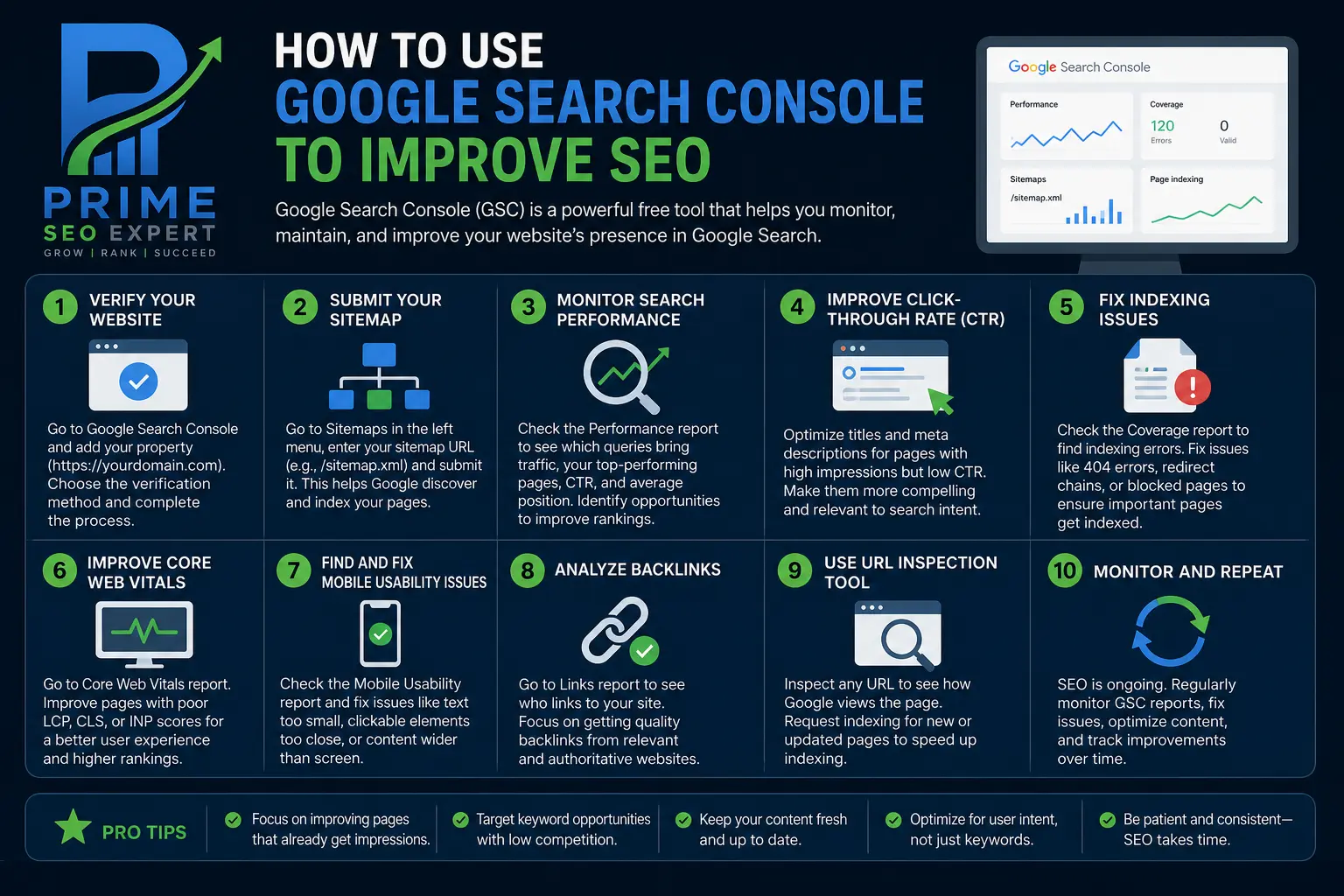
Google Search Console SEO is one of the most effective ways to understand how your website performs in Google Search and identify opportunities to improve organic traffic. Instead of guessing why a page is not ranking or which keywords attract visitors, you can use real search performance data to make informed decisions.
Google Search Console is a free tool that helps website owners monitor search visibility, understand indexing problems, analyze clicks and impressions, and discover queries that bring visitors to their websites.
Whether you manage a business website, blog, or online store, learning how to use Google Search Console can help you build a smarter SEO strategy. This guide explains how to use its most important features to improve rankings, fix website issues, and attract more relevant traffic.
What Is Google Search Console?
Google Search Console (GSC) is a free service from Google that helps website owners monitor and troubleshoot their presence in Google Search.
It provides information about how your pages appear in search results, which queries generate impressions and clicks, and whether Google can access and index your content.
Google Search Console is different from website analytics tools. It focuses on search performance before visitors arrive at your website, while tools such as Google Analytics help you understand what visitors do after arriving.
For a broader understanding of optimization, explore our Complete SEO Guide.
1. Analyze Clicks, Impressions, CTR, and Average Position
The Performance report is one of the most valuable features for Google Search Console SEO. It shows how your website performs in Google Search over a selected period.
The four main metrics are:
- Total clicks: How many times users clicked your website in Google Search results.
- Total impressions: How many times your website appeared in search results.
- Average CTR: The percentage of impressions that resulted in clicks.
- Average position: Your site’s average ranking position for the selected queries or pages.
These metrics help you identify where your SEO strategy is working and where improvements may be needed.
For example, a page with many impressions but a low click-through rate may need a more compelling title or meta description. A page with relatively few impressions might need stronger content, better keyword targeting, or improved internal links.
Remember that average position is not a fixed ranking for every user. Search results can vary depending on the query, location, device, and other factors.
2. Find Keyword Opportunities in the Performance Report
Google Search Console can reveal search queries that already generate impressions for your website. These queries often provide useful opportunities to improve existing content.
Open the Performance report and select the Queries tab. Review the search terms that bring your pages into Google results.
Look for queries that are relevant to your content but are not generating as many clicks as expected.
For example, if a guide about technical SEO receives impressions for searches related to website crawling and indexing, you can check whether the article answers those questions clearly.
Use these insights to:
- Expand sections that do not fully answer searchers’ questions.
- Add relevant subheadings where they improve readability.
- Improve internal links to related guides.
- Create a separate article when a query represents a distinct topic.
- Avoid creating multiple pages that target the same search intent unnecessarily.
The goal is not to insert every query into your content. Focus on satisfying the needs behind relevant searches.
3. Improve Pages With High Impressions but Low CTR
A page can appear frequently in search results without attracting many visitors. When this happens, review its search queries, average position, title, and meta description.
Your title should clearly explain the page’s value and match the searcher’s intent. Your meta description should summarize what readers can expect without making misleading promises.
For example, a generic title such as “SEO Tips” could be improved to “Technical SEO: A Practical Guide to Crawling and Indexing” if that accurately reflects the article.
However, low CTR does not always mean your title is poor. A page ranking lower in search results may naturally receive fewer clicks. Compare similar queries and positions before deciding what to change.
Make one meaningful improvement at a time, then monitor performance over a suitable period. Search Console data can help you evaluate the results, although it cannot guarantee that a particular change will increase traffic.
4. Identify and Fix Indexing Issues
Publishing an article does not guarantee that Google will index it. If important pages are missing from search results, use the Pages indexing report to investigate.
This report provides information about pages Google has indexed and pages that it has not indexed, along with reasons for exclusion when available.
Common issues include:
- Not found (404): The requested page does not exist at that URL.
- Redirect issues: Google encounters a redirect problem or cannot reach the intended destination.
- Blocked by robots.txt: Crawling is restricted by your robots.txt rules.
- Excluded by noindex: A page contains a directive telling search engines not to index it.
- Duplicate or canonical issues: Google identifies duplicate content or selects a different canonical URL.
- Crawled – currently not indexed: Google crawled the page but has not included it in its index.
Not every excluded URL requires a fix. Some pages, such as deliberate redirects or duplicate URLs, should remain excluded.
Start by checking whether the affected page is valuable, accessible, and intended to appear in search results. Correct the underlying problem before requesting indexing.
For more detailed troubleshooting, read our guide to Technical SEO and our SEO Audit Guide.
5. Use URL Inspection to Check Individual Pages
The URL Inspection tool helps you investigate how Google sees a specific page.
Enter the complete URL into the inspection field at the top of Search Console. The tool can show whether the URL is indexed and provide information about crawling, indexing eligibility, and the selected canonical URL when available.
If you have recently published or substantially updated an important page, you can use the live URL test to check whether Google can access it.
If the page is eligible for indexing, you may request indexing through Search Console. This does not guarantee immediate crawling or inclusion in search results.
Before requesting indexing, check that the page:
- Returns the correct HTTP status.
- Is not unintentionally blocked by robots.txt.
- Does not contain an unwanted noindex directive.
- Has an appropriate canonical URL.
- Provides useful, original content for visitors.
Request indexing after addressing real issues rather than repeatedly submitting the same unchanged URL.
6. Improve Internal Linking With Search Data
Internal links help visitors discover related content and help search engines understand the relationships between pages on your website.
Google Search Console can help you identify important pages that already attract search impressions or clicks. You can then connect these pages to relevant supporting articles.
For example, a website publishing SEO resources could link its main SEO guide to related content about keyword research, on-page SEO, technical SEO, and SEO audits.
When adding links, use descriptive anchor text that explains what the destination covers. Avoid forcing links into unrelated paragraphs or repeating the same keyword-rich anchor everywhere.
Review your site’s internal linking structure periodically, especially when publishing new content or updating existing pages.
7. Submit Your Sitemap and Monitor Website Changes
An XML sitemap helps Google discover important URLs on your website. In Search Console, open the Sitemaps section and submit your sitemap URL.
For a WordPress website using an SEO plugin, the sitemap is often generated automatically. Check your plugin settings to find the correct sitemap address.
After submitting it, monitor the reported status and investigate any errors. Remember that sitemap submission helps Google discover URLs but does not guarantee indexing.
You should also monitor Search Console after major website changes, such as changing permalink structures, redesigning navigation, deleting pages, or moving content to new URLs.
Use appropriate redirects when URLs change, update internal links, and verify that important pages remain accessible.
8. Track SEO Performance and Measure Improvements
SEO improvements take time, so use Search Console to compare performance across meaningful periods.
You can compare clicks, impressions, CTR, and average position before and after an update. Review both individual pages and relevant queries to understand whether performance is improving.
A practical monthly routine includes:
- Review pages gaining or losing clicks.
- Identify relevant queries with growing impressions.
- Investigate important pages that are not indexed.
- Improve content that no longer satisfies search intent.
- Check whether recent technical changes caused problems.
- Record updates so you can evaluate their impact later.
Avoid judging success from a single day’s data. Seasonal demand, algorithm changes, competition, and normal search fluctuations can all affect results.
Common Google Search Console SEO Mistakes to Avoid
Even useful data can lead to poor decisions when interpreted incorrectly.
Avoid these common mistakes:
- Requesting indexing repeatedly without fixing the underlying issue.
- Assuming every URL excluded from Google must be indexed.
- Changing titles based on CTR alone without considering ranking position and search intent.
- Creating separate articles for every similar query.
- Treating average position as a guaranteed ranking.
- Ignoring redirects and internal links after changing URLs.
- Expecting Search Console to improve rankings automatically.
Use the tool to diagnose problems, discover opportunities, and evaluate your decisions. Better results still depend on useful content, sound technical foundations, and a good user experience.
Conclusion
Google Search Console SEO gives website owners practical information about how their content performs in Google Search. By analyzing clicks and impressions, discovering keyword opportunities, improving CTR, checking indexing issues, and monitoring important pages, you can make more informed decisions about your SEO strategy.
Start with your most important pages and address the opportunities that matter most to your audience. Review performance regularly, fix genuine technical problems, and improve content where search data reveals a clear need.
Google Search Console is not a shortcut to higher rankings, but when used consistently alongside quality content and effective SEO practices, it can become an essential part of growing sustainable organic traffic.